Let Customers Skip the Queue & Order Themselves
Turn any Android or Windows screen into a self-ordering kiosk. Customers browse your menu, pay online and collect with a token — every order flowing straight into RoyalPOS billing, kitchen display and reports.
- Android or Windows
- Pay online
- Token & collect
- Fewer staff at peak
Serve More Guests With the Same Team
Kiosks cut queues at peak hours, free your staff for the kitchen and floor, and gently upsell every order.
Beat the Rush
Add ordering capacity without adding cashiers. Guests order the moment they walk in.
Slideshow Offers
Play an image slideshow of combos and offers while the kiosk is idle to drive attach sales.
Pay Online
Customers pay at the screen — UPI, cards and wallets — so the counter only hands over food.
Token & Collect
Each order prints a token number; the guest collects when it's called or shown on the display.
From Tap to Token in 4 Steps
Set Up the Kiosk
Install RoyalPOS kiosk mode on any Android or Windows touchscreen and point it at your menu.
Show Offers
An idle slideshow promotes your best sellers, combos and limited-time offers to every guest.
Select & Pay
The customer picks items, customizes, and pays online right at the kiosk.
Get a Token
A token is issued and the order lands in billing and the Kitchen Display instantly.
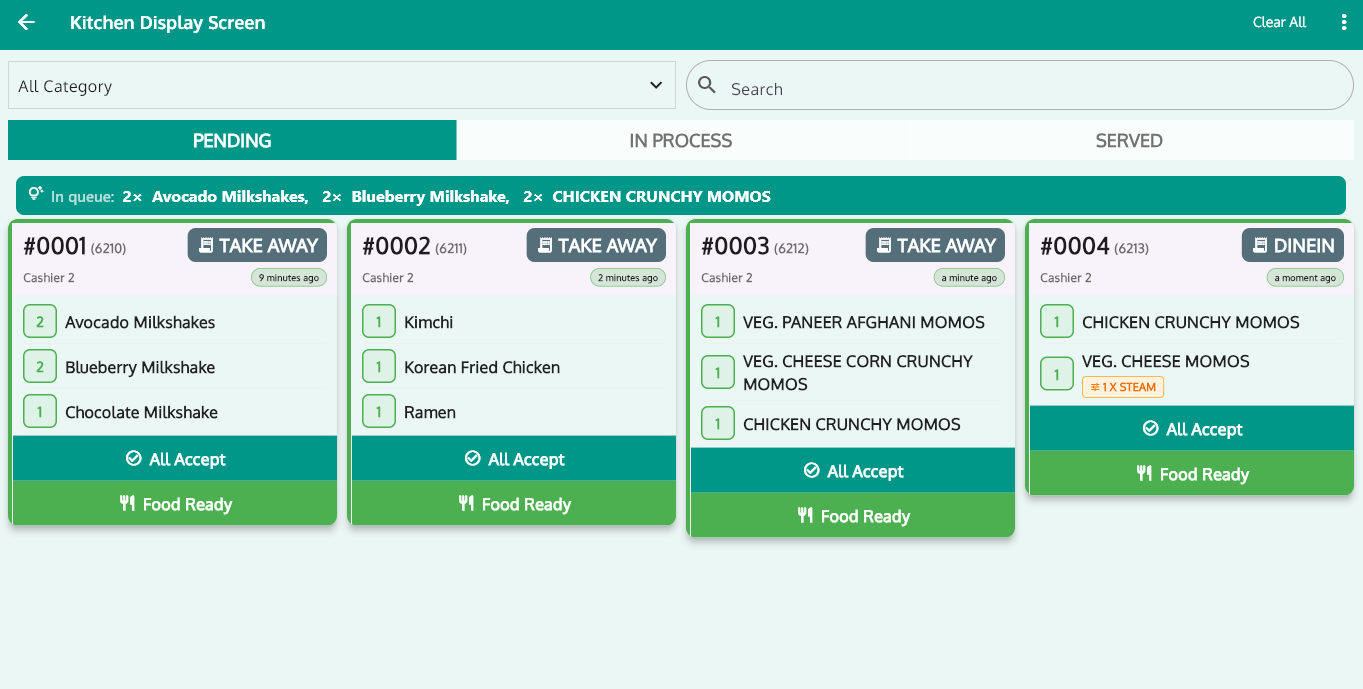
Kiosk, Kitchen & Billing — Perfectly in Sync
Unlike bolt-on kiosk apps, the RoyalPOS kiosk is part of your POS. Every self-order is one source of truth.
- Orders route to the Kitchen Display System automatically
- Sales appear in the same 35+ reports as counter orders
- Menu, pricing and offers managed once in the admin portal
- Pair with a Customer Display and a Token Counter screen that calls out ready orders
Self-Ordering Kiosk — Common Questions
What is a self-ordering kiosk?
▾It's a touchscreen where customers browse the menu, place their own order and pay, then get a token to collect their food. RoyalPOS turns any Android or Windows screen into one, connected to your POS.
Does the kiosk work on Android and Windows?
▾Yes. The kiosk runs on both Android and Windows, so you can reuse existing touch screens or standard kiosk hardware.
Can customers pay at the kiosk?
▾Yes. Customers select items and pay online at the kiosk, then receive a token number to collect their order.
Does it connect to the kitchen and billing?
▾Yes. Kiosk orders flow straight into RoyalPOS billing, the Kitchen Display System and your reports — nothing to reconcile separately.
Cut the Queue With a Self-Ordering Kiosk
See the RoyalPOS kiosk running end-to-end — from idle slideshow to token collection — in a quick live demo.