Swiggy, Zomato & Online Orders — All in One Screen
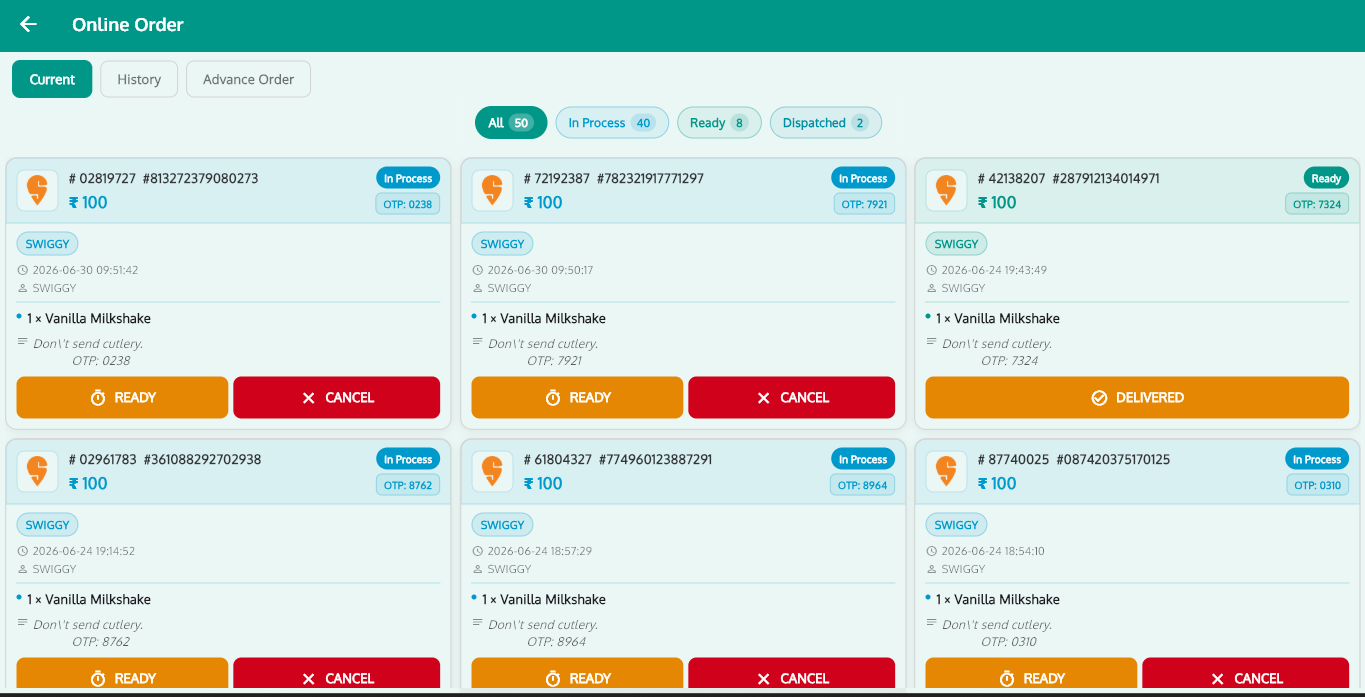
Stop juggling a tablet per aggregator. Every Swiggy, Zomato, FoodPanda and UberEats order lands directly inside RoyalPOS — with automatic menu sync, one-click item control and delivery sales counted in the same reports as your counter.
- Swiggy & Zomato inside the POS
- Automatic menu sync
- One-click item on/off
- Separate delivery pricing
Delivery Apps, Minus the Tablet Circus
RoyalPOS turns every aggregator into just another order source inside your POS.
Unified Order Management
Every delivery app order lands directly inside RoyalPOS — one queue, one workflow for the whole counter.
Automatic Menu Sync
Update your menu once in RoyalPOS and it syncs to the delivery apps — no separate portals to maintain.
One-Click Item On/Off
Ran out of paneer? Disable the item on every aggregator from the POS with a single click.
Multi-Outlet Location Sync
Delivery settings sync across all your outlet locations — manage the chain, not each store.
Delivery vs Dine-In Pricing
Set different prices for the delivery menu so aggregator commissions don't eat your dine-in margins.
No Extra Tablets Needed
Clear the counter — one POS screen replaces the row of aggregator tablets and chargers.
From Swiggy Ping to Sales Report in 3 Steps
Customer Orders on Swiggy or Zomato
The order is placed on any connected delivery app — Swiggy, Zomato, FoodPanda or UberEats.
It Appears Instantly in RoyalPOS
The order shows up right inside the POS with an accept-and-ready flow — the kitchen starts without anyone touching another tablet.
Sales Land in the Same Reports
Delivery sales are counted alongside dine-in and takeaway in your 35+ reports — one number for the whole business.
Your Brand's Own Customer App
Aggregators bring reach — your own app keeps the margin. RoyalPOS gives you a branded B2C ordering app on Android and iOS, managed from the same admin as your POS.
- Branded ordering app on Android & iOS with delivery and pickup
- Customers discover their nearest outlet automatically
- Advance and scheduled orders for planned pickups
- Menu, pricing and orders managed from the RoyalPOS admin
Pairs Perfectly With
Online Ordering Integration — Common Questions
Which delivery platforms does RoyalPOS integrate with?
▾RoyalPOS integrates with Swiggy, Zomato, FoodPanda and UberEats. All delivery app orders appear directly inside the POS for unified order management.
Do I still need one tablet per aggregator?
▾No. Every delivery order lands inside RoyalPOS itself, so one POS screen replaces the row of aggregator tablets on your counter.
Does the menu sync automatically with delivery apps?
▾Yes. Your menu syncs automatically to the delivery apps, and you can enable or disable items across aggregators from the POS with one click — with multi-outlet location sync of delivery settings.
Can delivery prices be different from dine-in prices?
▾Yes. RoyalPOS supports different pricing for your delivery menu and your dine-in menu, so aggregator commissions don't have to eat into your in-store margins.
Clear the Aggregator Tablets Off Your Counter
See Swiggy and Zomato orders flowing straight into RoyalPOS — with menu sync and one-click item control — in a quick live demo.