Kitchen Display System with Zero Paper Tickets
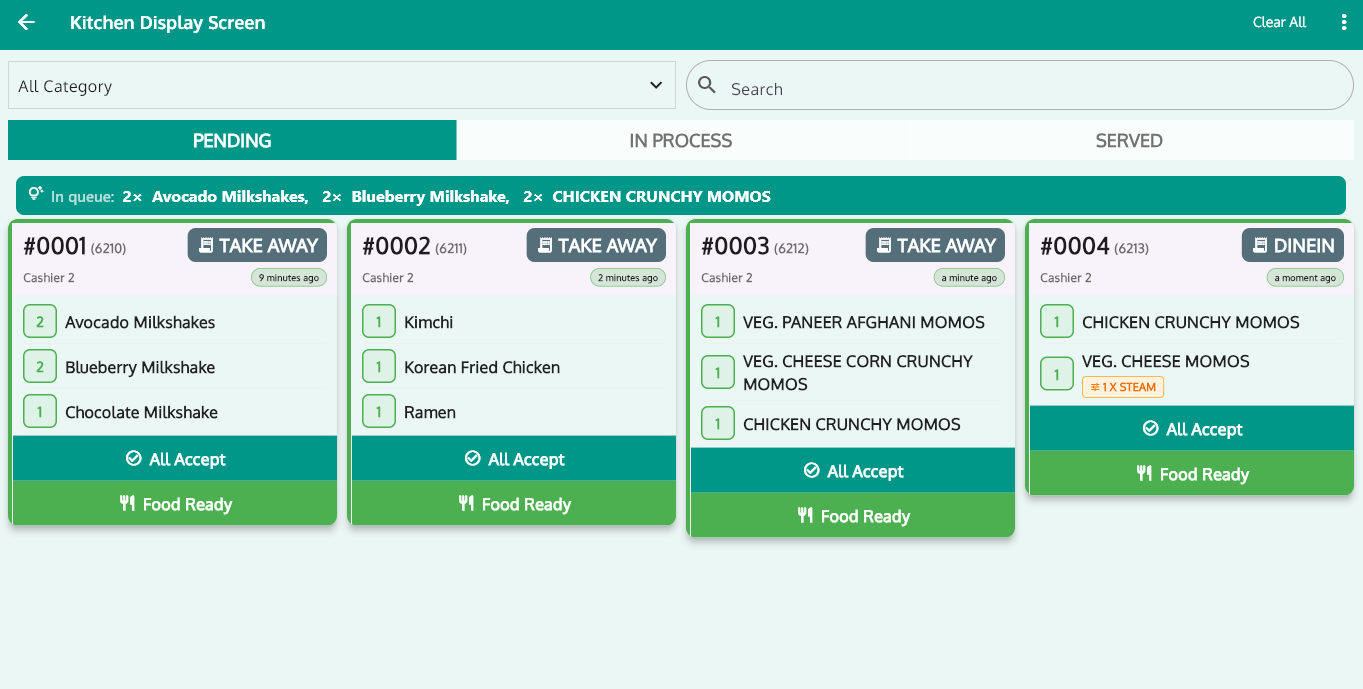
Every order your cashier punches appears on the kitchen screen instantly — sorted by table or order number. Chefs tap when food is ready, waiters get notified in real time. No lost KOTs, no shouting, no cold plates.
- Zero paper tickets
- Android or Windows screen
- Instant waiter alerts
- Works with KOT printers too
From Counter to Kitchen to Table in 4 Steps
One connected flow — no runner carrying paper, no ticket rail, no guesswork.
Order Punched
Your cashier (or kiosk) punches the order in RoyalPOS as usual — dine-in, takeaway or delivery.
Instant KDS Display
The order appears on the kitchen screen the same second, organised by table or order number.
Chef Marks Ready
The chef prepares the dish and taps it ready right on the screen — no pen, no paper, no shouting.
Waiter Notified
The assigned waiter is instantly notified, picks up the food hot and serves the table faster.
Everything Your Kitchen Screen Should Do
Designed for real rush hours — a chef sees exactly what to cook next, and nothing slips through.
Pending / In-Process / Served Tabs
Orders move through clear tabs so every chef knows what's waiting, what's on the stove and what's done.
Live Queue Summary Bar
A glance at the top of the screen shows how many orders are in the queue — pace the kitchen before it piles up.
Dine-In vs Takeaway Tags
Every ticket is tagged by order type, so packing counters and table service never get mixed up.
Category Filter & Search
Filter by category or search for an item so the tandoor, fryer and beverage stations see only what matters to them.
One-Tap Accept & Food Ready
Chefs accept an order and mark food ready in a single tap — fast enough for hands covered in flour.
Works Alongside KOT Printers
Not ready to go fully paperless? Run the display and your existing KOT printers together — both are supported.
What a KDS Actually Changes on the Floor
Paper tickets fall, smudge and get skipped in the rush. A kitchen screen makes the whole order flow visible — to the chef, the cashier and the waiter.
- No lost or unreadable paper KOTs — every order is on screen until it's served
- A quieter kitchen — waiters stop asking "is table 4 ready?" because they're notified
- Faster table turns — food goes out the moment it's ready, tables free up sooner
- Better order accuracy — chefs cook exactly what was punched, item by item
Pair Your Kitchen Screen With
Kitchen Display System — Common Questions
What is a Kitchen Display System (KDS)?
▾It's a digital screen in your kitchen that replaces paper KOT tickets. The moment your cashier punches an order it appears on the screen by table or order number, the chef marks it ready, and the assigned waiter is instantly notified.
What hardware does the KDS need?
▾Any Android tablet or TV, or any Windows screen. No special kitchen hardware is required — mount a screen you already have and go paperless.
Can I use KOT printers along with the Kitchen Display?
▾Yes. RoyalPOS supports both. Run the display alongside your existing KOT printers, or go fully paperless — whatever suits your kitchen.
How does the waiter know when food is ready?
▾The moment the chef marks a dish ready on the kitchen screen, the assigned waiter is instantly notified — no shouting across the pass, no cold food waiting on the counter.
Take Your Kitchen Paperless This Week
See the full flow live — cashier punches, kitchen screen lights up, chef taps ready, waiter serves. All on the screens you already own.